Get rid of hot pink pixels on a Canon camera sensor

Sometimes image sensors on digital cameras develop stuck or dead pixels. Sometimes showing as a bright pink pixel on the jpg image. Canon cameras and probably other brands too have a function to self repair.


  1. Put a fully charged battery in the camera.
  2. From the Menu (Under Advanced Functions) initiate a "Manual Sensor Cleaning".
  3. Wait for about half a minute, then turn off the camera.


This worked on my Canon 50D
Fix Apple Macbook Force Touch

This fix works for 2015 Macbook Pro.

Perform an SMC reset:
With the Macbook turned on, hold control + option + shift + power button.

Your computer should instantly turn off. Turn it back on with the power button and your force touch should now work.

If it does not work, try checking the trackpad settings under system preferences. Make sure “force click & haptic feedback” checkbox is ticked on.

Camera or phone works only in one USB port on MacBook Pro

Fix it by reseting the System Management Controller (SMC), follow the instructions below to restore the power to the port:

1. Shut down the computer.
2. Connect the MagSafe power adapter (powered) to the computer.
3. On the built-in keyboard, press Shift-Control-Option keys on the left side and the power button at the same time.
4. Release all the keys and power button at the same time.
5. Press the power button to turn on the computer.

There seems to be nothing happening when reseting the SMC, the LED on the MagSafe may change states or turn off temporarily.

Remove Weibo, Tudou and Youku on iPhone

Go to: Settings > General > Keyboard and delete the Chinese keyboard.

Remove failed prerm script on OpenWrt

To uninstall lighttpd package intro the following command in ssh:

opkg remove lighttpd --force-remove

Switch to raw on Apple Photos

After you have clicked "Edit", select "Use RAW as original" under the Image menu. When you close the edit session, the thumbnail will now show "R" on the stack instead of "J", and the raw version will open the next time you edit that photo.

Sync iBooks downloaded on iPhone or iPad to computer with iTunes

To transfer purchased books from iPhone/iPad to computer, go to iTunes File > Devices > Transfer Purchased

New Photos library doesn't show in iTunes for iPad or iPhone sync

After moving Photos library to an external disk it does not show on iTunes for sync.

Solution:


  1. Close iTunes
  2. Open Photos app
  3. Preferences> Click on Use as System Photo Library button
  4. Then open iTunes and it should display the Photos app as an option in the dropdown for Photos>Sync Photos.

How to revert back an OpenWrt router configuration

Your router has been misconfigured and you can't access your router anymore. To fix it you need to do a restart process. Here are the steps:

Put your router in failsafe mode:


Set your PC ip: 192.168.1.2 and subnetmask 255.255.255.0 and gateway 192.168.1.1 (computer may need to restart)

Power off the router

Disconnect the WAN cable

Only connect your PC Ethernet cable to ETH0

Power On the router

Wait for the router to start the boot sequence (SYS LED starts blinking)
When SYS LED is blinking, hit restart button (SYS LED will be blink in a faster rate means your router is in failsafe Mode) (you have to hit the button before the router boots)(you may need to press the restart button twice to enter failsafe mode)


-----

'Factory reset' to default config


Enter console commands:
(You may need to activate Telnet on Windows)

# telnet 192.168.1.1

(wait for the OpenWrt BusyBox front page indicating "FAILSAFE MODE active)

 === IMPORTANT ============================
  Use 'passwd' to set your login password
  this will disable telnet and enable SSH
 ------------------------------------------


BusyBox v1.19.4 (2013-03-14 11:28:31 UTC) built-in shell (ash)
Enter 'help' for a list of built-in commands.

  _______                     ________        __
 |       |.-----.-----.-----.|  |  |  |.----.|  |_
 |   -   ||  _  |  -__|     ||  |  |  ||   _||   _|
 |_______||   __|_____|__|__||________||__|  |____|
          |__| W I R E L E S S   F R E E D O M
 -----------------------------------------------------
 ATTITUDE ADJUSTMENT (12.09, r36088)
 -----------------------------------------------------
  * 1/4 oz Vodka      Pour all ingredients into mixing
  * 1/4 oz Gin        tin with ice, strain into glass.
  * 1/4 oz Amaretto
  * 1/4 oz Triple sec
  * 1/4 oz Peach schnapps
  * 1/4 oz Sour mix
  * 1 splash Cranberry juice
 -----------------------------------------------------
root@(none):/#


# mount_root (to mount the JFFS2 partition)

# firstboot

# rm -r /overlay/*  (or /overlay/upper/* on some routers)

# mtd -r erase rootfs_data (this will reboot the device as part of the process)


-----------

Once your router restart go to address: 192.168.1.1 in your browser


That's it.


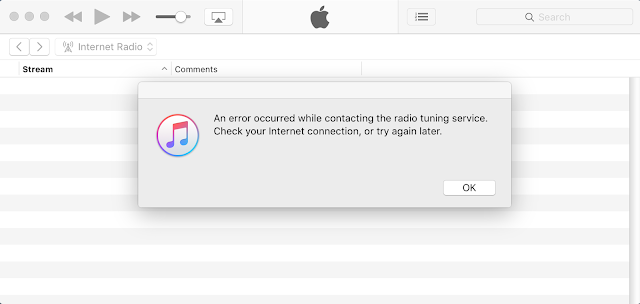
Apple iTunes Internet Radio connection error


An error occurred while contacting the radio tuning service. Check your Internet connection, or try again later.

That is the error message from Apple iTunes when trying to connect to Internet Radio.

Solution:

In iTunes menu go to: iTunes - Preferences - Restrictions, then on Disable uncheck all the options. Open the Internet Radio, it works! Now you can enable again the restrictions.


Pinterest's confirm website error


API method not found
and

Looks like we had trouble connecting to your website. Please try again later.

Those are the messages people is getting when trying to confirm their website within their Pinterest account.

I've tried their instructions (copy and paste the meta tag) with two different top level domains without luck. The download this file method also not working (unable to download the file)